Mari 8.0 Adds New Tools for 3D Texture Artists
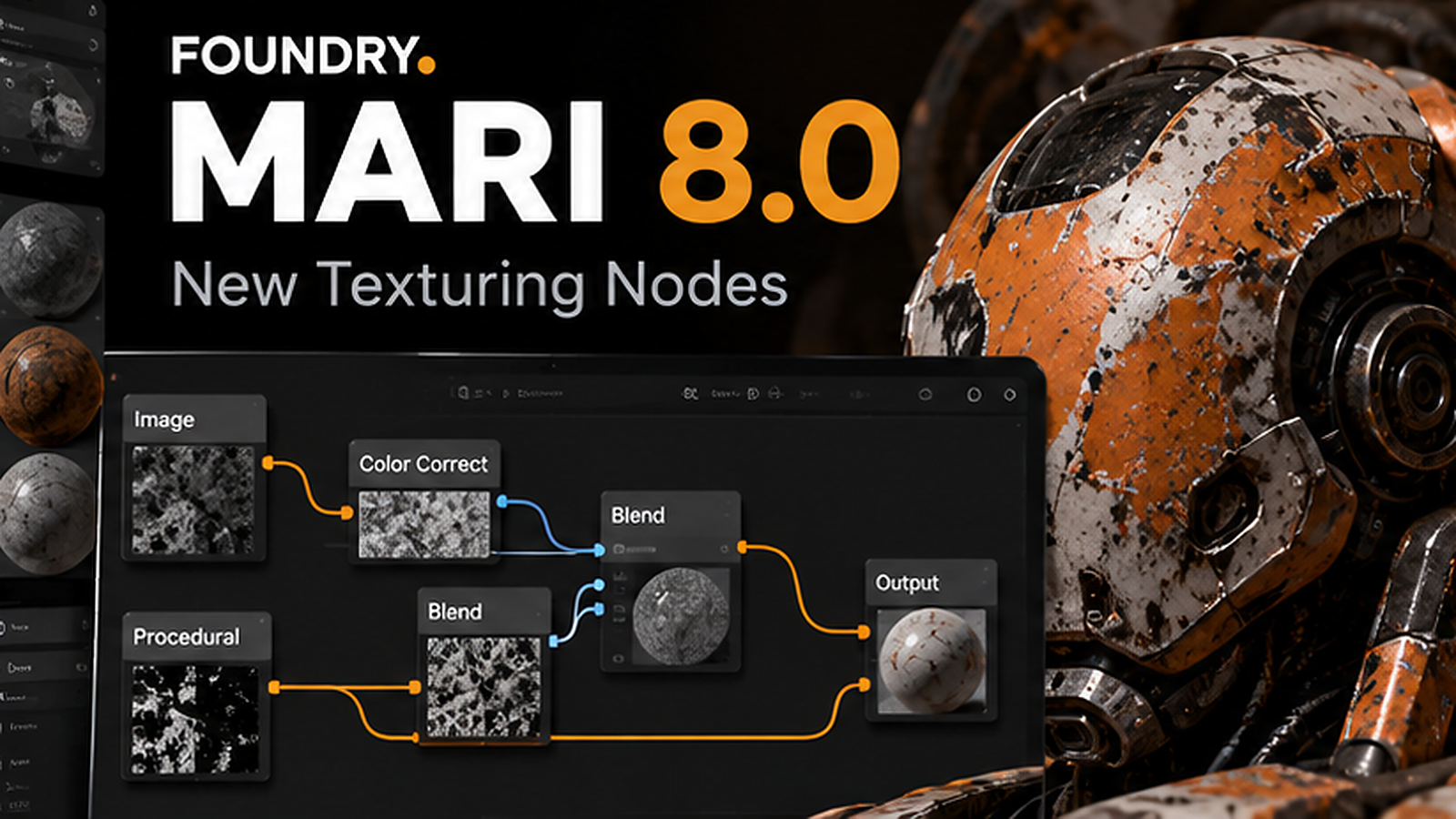
Foundry has released Mari 8.0, a major update to its professional 3D texture-painting software. The release brings more than 50 additions to the Node Graph, including tools designed to make difficult texture projections, repetitive patterns, look-development comparisons and masking easier to control. The final release was covered on October 14, with additional industry coverage appearing on October 19.
Mari is used for painting detailed assets in film, visual effects and games. That makes this update especially relevant to artists who work with complicated UV layouts, large environments or hero characters where material consistency matters as much as individual brush strokes.
Tri-Planar Tiled helps with difficult UVs
A standard UV-based texture relies on a flattened map of the model. When the map is stretched, split into many islands or missing entirely, surface detail can become uneven or visibly broken. Tri-planar projection approaches the problem from a different direction by projecting imagery along the X, Y and Z axes.
Mari 8.0 introduces a Tri-Planar Tiled node that uses one source texture and blends the projections across the model. The node offers adjustable blending, noise-driven transitions and a Smart blend mode intended to preserve fine surface detail. It does not remove the need for good UVs in every production, but it gives artists a useful way to prototype and cover problem areas.
Hex Tile makes repeated textures less obvious
Repeating a texture over a large floor, wall, landscape or prop often produces a recognizable grid. Viewers can spot identical stains, scratches and color patches even when the underlying material is technically correct.
The new Hex Tile node blends texture repetitions across a hexagonal layout rather than a simple rectangular grid. That can break up the obvious repetition and produce more natural-looking variation, particularly for environments and surfaces viewed over a wide area. Artists should still inspect the result at the final camera distance and lighting setup.
Compare and Color Remap speed up look development
Mari 8.0 adds a Compare node for A/B wipe comparisons between different Node Graph streams. Instead of toggling entire branches on and off and relying on memory, an artist can evaluate alternative looks more directly. That is useful when a supervisor requests subtle changes to roughness, weathering or color.
Color Remap consolidates controls for hue, saturation, exposure and gamma. Having these adjustments together makes a material easier to refine and review, especially when a procedural graph contains many operations. The update also adds 49 mathematical nodes for more advanced procedural material setups.
Masking becomes more flexible
Texture artists often isolate regions using material IDs, surface colors or painted selections. Mari 8.0 expands those options with Color Mask and Multi Color Mask nodes, along with the ability to generate color-ID masks from canvas selections or Selection Groups.
Foundry also allows a mask port to be added to any node in the Node Graph. That can simplify graph organization because artists can constrain an operation without rebuilding the material structure around it. For large production graphs, this is the kind of small improvement that can save repeated manual work.
There are workflow and pipeline changes too
The release adds trackball-style navigation as an alternative to orbit controls, clearer identification of archived projects and logical operators in Shelf search. It also moves Mari to the CY2025 VFX Reference Platform specification and adds read-only support for cameras stored in USD files.
Those changes are less visually dramatic than the texture nodes, but they matter in studios that move assets between applications and rely on consistent software environments. A new node is only useful if it can fit into an established production pipeline without creating avoidable handoff problems.
Who should upgrade to Mari 8.0?
Artists who regularly texture large environments, hard-surface assets or creatures stand to benefit most from the new projection and masking tools. Technical artists who build reusable procedural materials may also appreciate the extra mathematical and transformation nodes.
The sensible upgrade path is to duplicate an existing project, verify color-management behavior, test important node graphs and compare exported textures against the previous version. Studios should also check plugin and pipeline compatibility before upgrading an entire team.
Pricing, compatibility and free access
According to current coverage, Mari 8.0 supports Windows 11 and Rocky Linux or RHEL 9. Commercial Mari is subscription software, and pricing varies by individual or team license and region. Foundry also offers a non-commercial edition for learning and a trial for evaluating the full product.
If you are learning texturing rather than working on a client project, the non-commercial option is worth investigating before paying for a production license. Verify its current restrictions directly with Foundry, because a learning license is not the same as permission to use the software commercially.
Why Mari 8.0 matters beyond one application
The direction of this release reflects a broader shift toward more procedural, adjustable creative workflows. Artists increasingly need to make changes late in production without repainting every texture by hand. Reusable nodes, better masking and direct A/B comparison help keep that flexibility intact.
Mari 8.0 does not replace artistic judgment or good material references. It reduces friction around the technical steps so artists can spend more time evaluating whether a surface looks believable in the final shot.
Sources and further reading
Foundry: Mari product and Mari 8.0 overview
CG Channel: Foundry releases Mari 8.0
More creative software coverage on Nejma
GOT ANY QUESTIONS LEFT?
Mari 8.0 adds over 50 Node Graph nodes, including Tri-Planar Tiled, Hex Tile, Compare and Color Remap, plus new mask workflows and navigation improvements.
Its Tri-Planar Tiled node can project a texture along three axes, helping with stretched, awkward or missing UV layouts. That does not mean every production can ignore UVs.
The full commercial edition requires a paid license, but Foundry offers a free non-commercial learning option and a trial.
The release is listed for Windows 11 and Rocky Linux or RHEL 9. Check Foundry documentation for exact requirements.