Premation 1.0 Is a Free After Effects Alternative
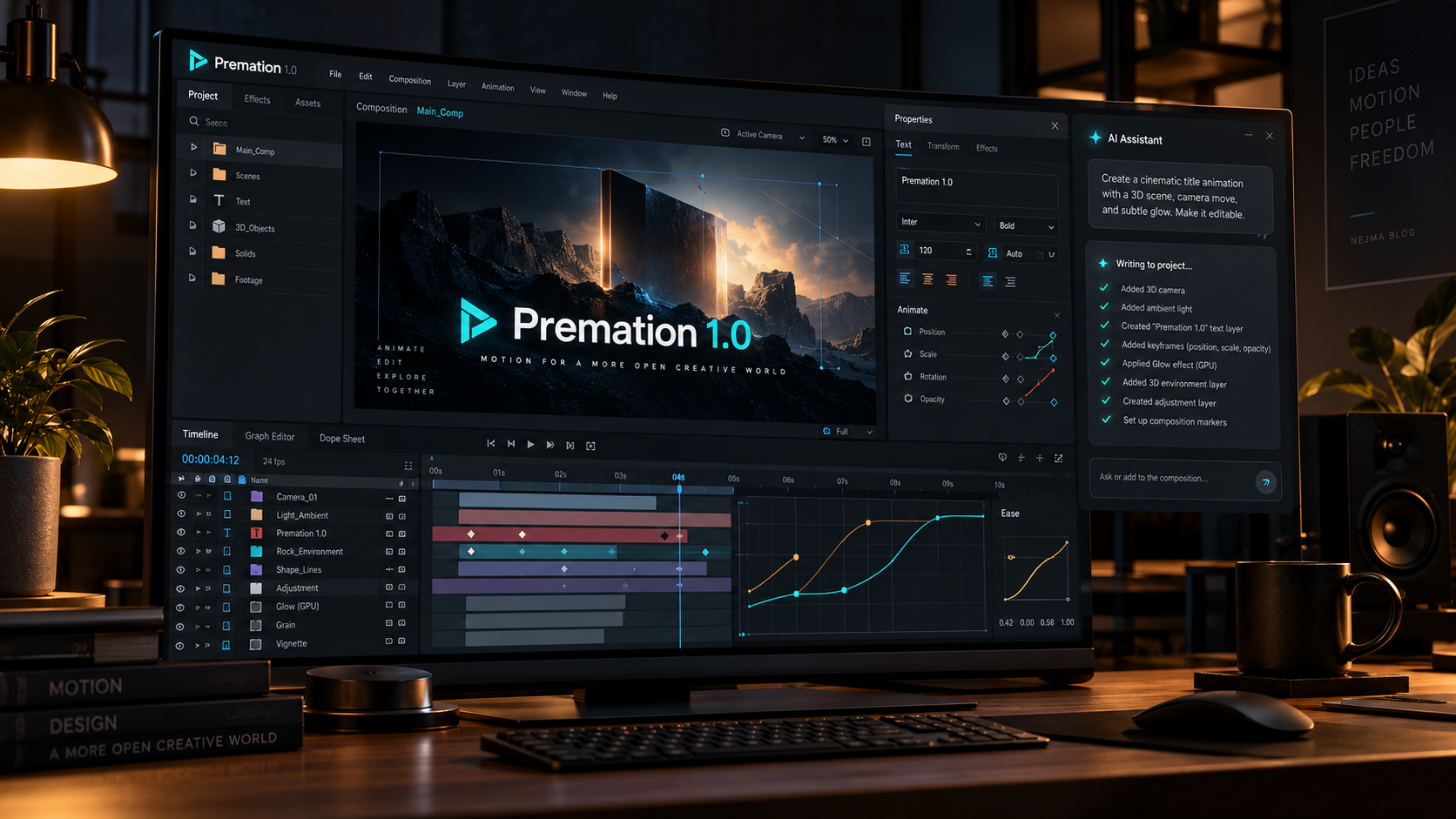
A new challenger to Adobe After Effects has arrived with a particularly direct pitch: keep the familiar motion-design workflow, remove the subscription, and make the underlying project editable by both humans and AI assistants. Premation released version 1.0 on October 13, 2026, followed by a 1.0.1 update addressing export reliability and macOS builds.
Premation is a free, AGPL-licensed desktop motion editor for Windows and macOS. It includes compositions, a keyframe timeline, graph editing, text animation, 2D and 3D layers, and GPU effects. The project also says it can open After Effects .aep and .aepx files, although that claim should not be confused with perfect compatibility across every plugin or expression.
What Premation 1.0 actually includes
The application uses a native C++ rendering engine separate from its Electron and React editor. Premation says this architecture drives its viewport and exports through GPU acceleration while allowing the interface to recover if the engine process stops. Its own benchmarks report large improvements for certain effects, but those are developer measurements rather than independent performance tests.
The core interface uses the vocabulary motion designers know: precompositions, parenting, mattes, cameras, easing curves, text animators and a graph editor. That makes it more directly comparable to After Effects than a general-purpose video editor that happens to offer keyframes.
Claude and ChatGPT can edit real timeline objects
One of the headline additions is a local connection for assistants including Claude, ChatGPT, Cursor and Antigravity. A user can request a logo reveal or a staggered text animation, and the assistant can create real layers, keys and effects in the open project.
Premation says each request can be undone as one action and that importing files or rendering video requires user approval. Those controls matter because an agent should not silently replace a composition or access arbitrary files just to fulfill a visual request.
After Effects files and professional exports
The official feature list includes opening .aep and .aepx compositions and importing SVG, Lottie and glTF assets. Export targets include H.264 MP4, ProRes MOV, WebM, Lottie JSON, image sequences and editorial handoff formats. The October 13 version 1.0.1 update bundles the FFmpeg build used for exports and offers a repair action if the export pipeline fails.
This is promising for freelancers who deliver animated logos, social motion graphics or interface animations. Still, complex projects that depend on proprietary third-party effects, expressions or color pipelines should be tested individually before anyone promises full round-trip compatibility.
The plugin system is a second major change
Version 1.0 also adds a native plugin platform. According to the project, plugins can contribute commands, panels, importers, exporters, presets and on-canvas handles. Premation says it added dozens more After Effects-style effects in the same release.
An extensible ecosystem could be more important than a long initial feature list. Motion designers often depend on specialized scripts and effects, so an open editor becomes more useful as third-party workflows can be rebuilt around it.
What open source does and does not guarantee
Premation publishes its code under AGPL-3.0, offers local project storage, and advertises no watermark or subscription. That is materially different from a free trial that limits exports. It also allows technically inclined users to inspect and contribute to the project.
Open source does not automatically mean professional maturity. Users should verify rendering consistency, crash recovery, typography, plugin coverage, licensing obligations and export quality before relying on it for paid deliverables. The project has only just reached 1.0.
A sensible first test for motion designers
Start with a short composition containing animated text, shape layers, easing and a simple camera move. Export an MP4 and a transparency-preserving format, then compare timing, colors and edge quality. Next, open a copy of a real After Effects project and note what survives the import.
Finally, try the assistant on a duplicate project and inspect every generated layer. The question is not whether the AI can produce an impressive demo; it is whether the editor keeps the animation understandable and controllable afterward.
The bigger competitive signal
Premation arrives during growing interest in lower-cost creative suites and open alternatives to incumbent tools. Its combination of a conventional timeline, a native renderer and agent-driven edits is an unusually direct attempt to compete on workflow rather than just price.
It is too early to call it a replacement for After Effects in every studio. But for creators who primarily need editable title sequences, logo animations and social graphics, it is a new option worth evaluating on its own merits.
Sources and further reading
Read the official Premation 1.0 release and changelog
Read Premation installation and platform guidance
Read the project open-source overview
Explore more articles on the Nejma Blog
GOT ANY QUESTIONS LEFT?
Premation describes its desktop editor as free, without a watermark or subscription, and publishes the source under AGPL-3.0.
Its official documentation lists .aep and .aepx import, but complex files should be tested for compatibility rather than assumed to work perfectly.
The new local assistant connection can create actual layers, keyframes and effects in a project, rather than only returning a rendered video.
The October 13 version 1.0.1 release includes macOS builds alongside Windows. Linux does not have an official installer in this release.