Filmora 16 Adds AI Editing and Camera Tracking
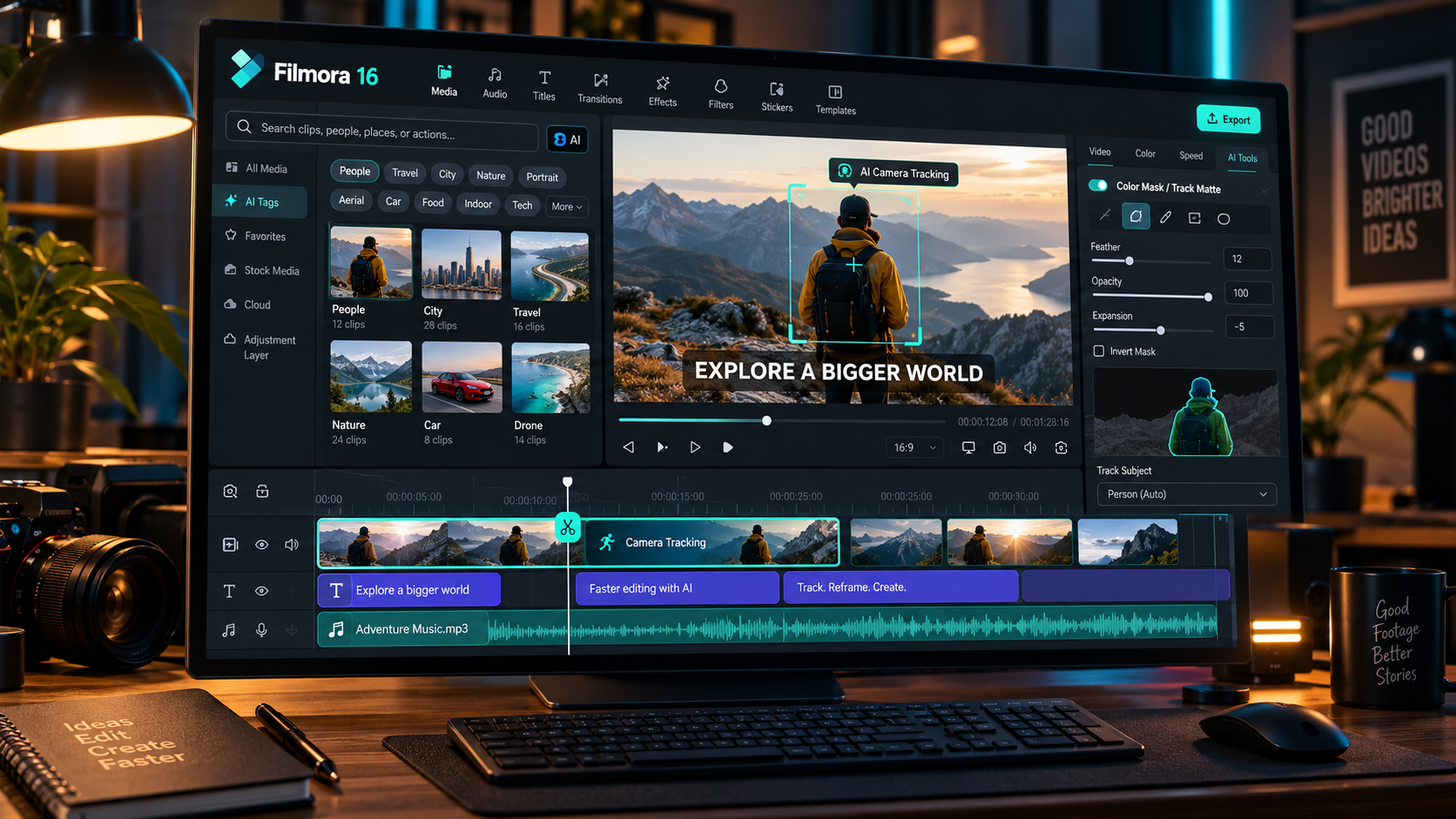
Wondershare launched Filmora 16 on October 9, 2026, with a focus on the part of editing that often consumes more time than creative decision-making: finding footage, following subjects, isolating colors and preparing captions. The release combines AI-assisted media organization with more precise editing controls.
The update is notable because Filmora has traditionally emphasized approachable editing. Filmora 16 adds features that are usually associated with more advanced workflows, while still aiming at YouTube creators, social-media editors and small marketing teams. The practical question is whether those controls save time on real projects, not simply whether they look impressive in a launch demo.
AI Media Analysis makes large footage libraries searchable
Filmora says AI Media Analysis identifies visual content in clips and images, then generates descriptions, tags and editing suggestions. The Smart Media Bin helps creators browse and filter those assets.
For an editor with hours of interviews, product footage or travel clips, searchability can be more valuable than another visual effect. It can reduce the time spent scrubbing timelines simply to find one usable moment. Editors should still check suggestions, especially when the content is visually similar or context-dependent.
Camera Tracking reduces manual keyframing
The new Camera Tracking tool can follow a head, body or custom region and create camera-following effects. That is useful for vertical video, action clips and shots where the subject moves across a wide frame.
Tracking quality matters more than the presence of a tracking button. Fast movement, occlusion and abrupt cuts can challenge automated systems. Creators should inspect the full clip and correct drift rather than assuming every tracking pass is ready for publication.
Color Mask and Track Matte add finer control
Color Mask lets an editor apply corrections to selected areas instead of treating the whole frame equally. Track Matte uses one layer to define where another appears, making compositing and reveal effects more flexible.
These features bring Filmora closer to workflows where the editor needs to preserve a product color, brighten one part of a shot or build an animated reveal. They are not substitutes for deliberate grading and compositing, but they reduce the need to leave the application for straightforward tasks.
360-degree reframing opens another type of footage
Filmora 16 adds 360-degree video reframing with adjustable viewing angles, keyframes and camera-movement presets. That can turn immersive capture into conventional, directed shots.
The feature is most useful to creators who already own a 360 camera. Reframing still depends on capture resolution, stabilization and subject placement, so editors should test exports at the intended delivery size before building a full project around it.
Captions get a more structured workflow
The release also introduces dedicated subtitle tracks, automatic correction suggestions and dynamic caption styles. For social content, captions are not an afterthought: they affect readability, pacing and how a video performs without sound.
Editors should verify names, specialized terminology and timing. Automatic caption correction can speed up the first pass, but a human review is still necessary for branded content and anything with legal or technical claims.
Who should consider updating
Filmora 16 looks most relevant to solo editors, creators with growing media libraries and teams producing short-form content repeatedly. Those groups are likely to benefit from media organization and faster finishing tools.
Before changing a production workflow, test the update on a duplicate project. Check tracking reliability, caption export, performance and compatibility with the formats you use. A release can offer useful features while still introducing changes that need testing.
What this says about the editing market
The competitive battle is shifting from raw generation to the entire editing process. Tools that can help users find, select, refine and deliver footage may offer more durable value than tools that only create a spectacular first draft.
Filmora 16 illustrates that trend. Its strongest argument is not that AI edits everything for you, but that editors can spend less time on routine operations and more time on pacing, story and visual decisions.
Sources and further reading
Wondershare Filmora 16 launch announcement (October 9, 2026)
Filmora official product website
Explore more creative technology coverage on Nejma
GOT ANY QUESTIONS LEFT?
Wondershare announced the release on October 9, 2026.
It identifies visual content in imported assets and generates searchable descriptions, tags and editing suggestions.
Yes. Camera Tracking is designed to follow a head, body or custom area and help create camera-following effects.
Yes. It adds reframing tools for 360-degree footage, including viewing-angle controls, keyframes and movement presets.